video-lens GitHub

Open source · a skill for Claude Code, Codex, Cursor and other coding agents

Know what’s in a video before you spend an hour on it

Paste a YouTube link into your coding agent. video-lens writes a summary, the takeaway, key points and a timestamped outline, and opens them in your browser with the video playing beside the text. Click any line to jump there.

npx skills add kar2phi/video-lens

Then, in your agent: /video-lens https://youtu.be/…

Open an example report View on GitHub

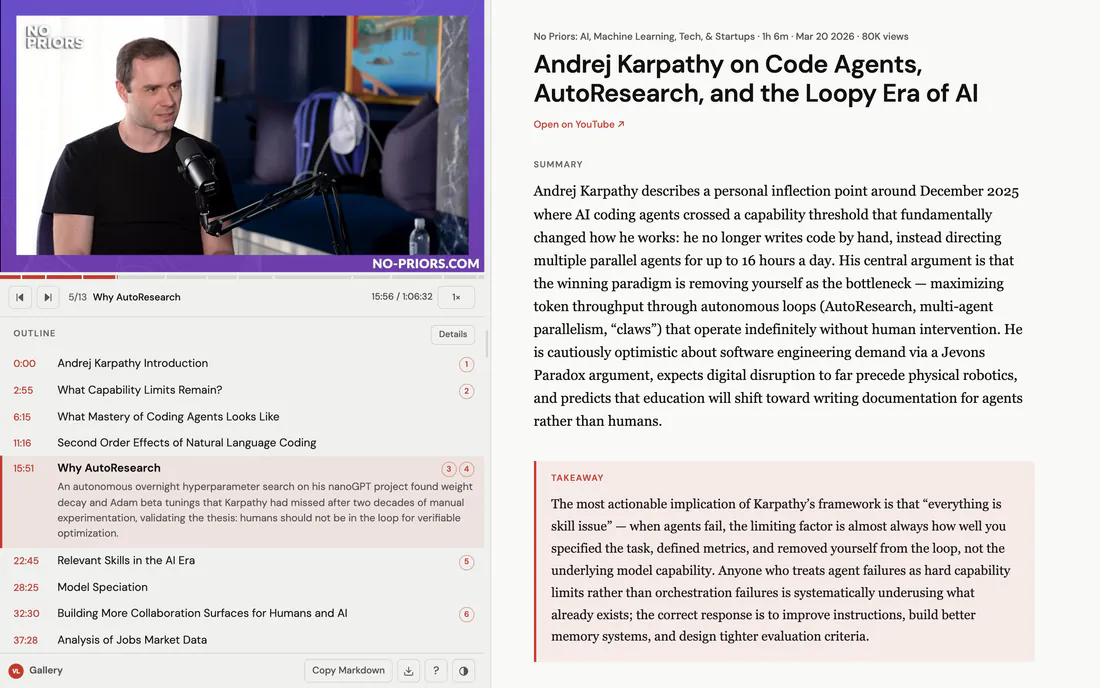
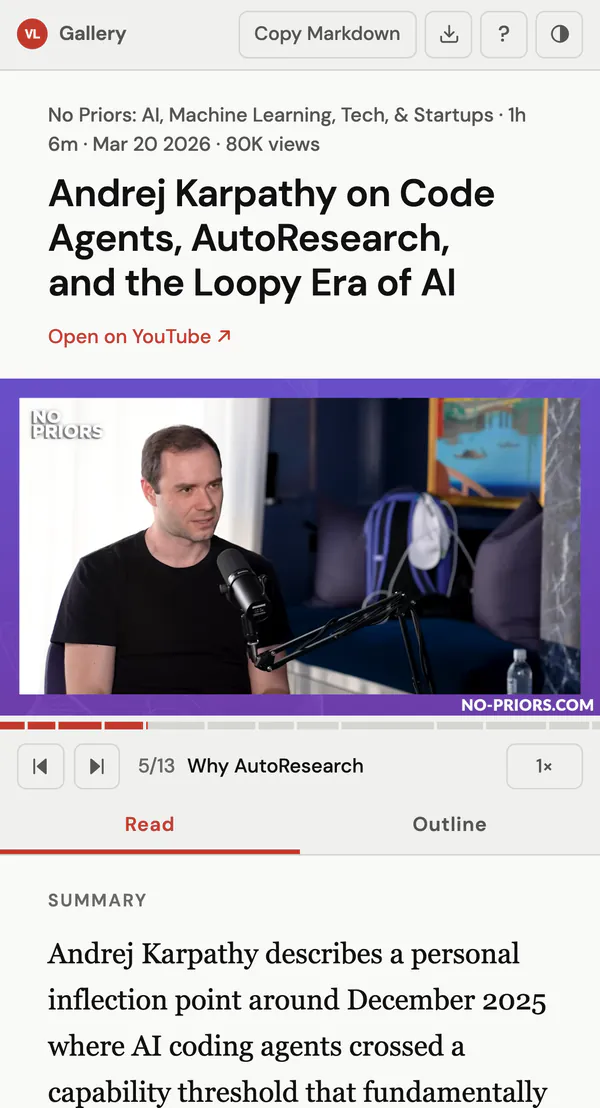
A video-lens report of Andrej Karpathy’s No Priors interview. Left: the video, a bar of its 13 sections with the fifth playing, and the outline with that section open. Right: the title, the summary and the takeaway. The same report on a phone: the player stays at the top, with Read and Outline tabs under it.
A real report, made by video-lens from a 66-minute interview. Open it and press play.

How it works

Paste a link. Read the report. Watch only the part you need.

video-lens is a skill: instructions and a few Python scripts your agent runs. It fetches the captions, your agent’s model writes the report, and the skill renders it into a page on your machine.

  1. Install the skill

    One command with the skills CLI, plus two Python packages for the captions and the video’s details.

    • npx skills add kar2phi/video-lens
  2. Give your agent a link

    Use the command, or just ask. Name a language or a focus in your own words.

    • /video-lens https://youtu.be/…
    • TL;DR this video: https://youtu.be/…
    • /video-lens <url> focus on the pricing part
  3. Read beside the video

    The report opens in your browser and is saved in ~/Downloads/video-lens/. Ask for a change (“tighten the takeaway”) and the same report is rewritten in place.

    • tighten the takeaway

The report

Four parts, each with its own job

Each part has its own shape, so you can tell them apart before you read a word. The text below is from the example report.

Summary

Andrej Karpathy describes a personal inflection point around December 2025 where AI coding agents crossed a capability threshold that fundamentally changed how he works: he no longer writes code by hand, instead directing multiple parallel agents for up to 16 hours a day. His central argument is that the winning paradigm is removing yourself as the bottleneck…

What the video says, not what it is about. A few sentences you can read in a minute to decide whether the hour is worth it.

Takeaway

The most actionable implication of Karpathy’s framework is that “everything is skill issue”: when agents fail, the limiting factor is almost always how well you specified the task, defined metrics, and removed yourself from the loop, not the underlying model capability.

The one thing to remember, marked so it stands out from the rest.

Key points

  1. “Skill issue” as the binding constraint 2:55
  2. AutoResearch: removing the researcher from the loop 15:51

    Karpathy built an autonomous loop on top of his nanoGPT-style training playground that runs hyperparameter search overnight, and it found improvements a two-decade researcher had missed.

  3. Evaluability is the prerequisite for automation 15:51
  4. Model jaggedness: on rails or off 22:45

Numbered, each with why it matters and the detail behind it. Skim mode (s) shows only the headlines. A time chip plays that section; the points of the playing section light up.

Outline

  1. 11:16Second Order Effects of Natural Language Coding
  2. 15:51Why AutoResearch34 An autonomous overnight hyperparameter search on his nanoGPT project found weight decay and Adam beta tunings that Karpathy had missed after two decades of manual experimentation.
  3. 22:45Relevant Skills in the AI Era5
  4. 28:25Model Speciation
  5. 32:30Building More Collaboration Surfaces for Humans and AI6

Every section with its time, from the video’s chapters when it has them. Click a row and the video plays from there; the bar above the outline shows where you are and how long each section is.

The player beside the text

Watch and read at the same time

The video stays in view while the text scrolls. Drag the divider, or press 1 2 3 for a small, medium or large player. The playing section is highlighted as the video runs. On a phone the player stays at the top and the report becomes two tabs, Read and Outline.

Light and dark themes, “Copy Markdown” for your notes, and YouTube’s own player with its captions, speed and fullscreen.

k j l
Play or pause, back or forward 10 s
p n
Previous or next section
, .
Slower or faster
o s
All outline details, skim key points
e t
Copy Markdown, switch theme
?
All shortcuts

Around the report

A library of what you watched, and what to watch next

The gallery and the recommendations are two more skills in the same repo. Whisper and sharing are part of video-lens itself.

No captions? Whisper

When a video has no captions, video-lens asks first, then downloads the audio and transcribes it on your machine with Whisper. The report is the same.

yes, transcribe it locally

Gallery

Every report you made, with thumbnails, summaries and tags. Search and filter by title, channel, tag or any word in the text.

/video-lens-gallery

Recommendations

New videos on a topic, from your subscriptions and beyond, ranked with a reason each. It skips what you already watched or summarised.

/video-lens-recs what’s new in Rust this week

Sharing

Say “share” and you get an unlisted link to the report on video-lens.org, with the same player beside the text. Say “unshare” and it is gone.

share

  • Any caption language
  • Reports in the video’s language
  • Uses the video’s chapters
  • Markdown export
  • Works with local models
  • MIT licensed

Privacy, in short

Your reports stay on your machine until you say “share”

On your machine

  • Reports are plain HTML files in ~/Downloads/video-lens/. No account, no cloud.
  • Captions come from YouTube; the report is written by the model your agent already uses. With a hosted model, the transcript goes to its provider, as any prompt would.
  • Nothing is uploaded unless you ask, and the skill asks before your first share.

When you share

  • The link is unlisted, not private: there is no index of shared pages, and search engines are asked not to list them.
  • Only the report goes up: summary, takeaway, key points, outline, tags and the video’s title, channel and date. Never the transcript or the video description.
  • The shared page loads nothing from YouTube until the reader clicks play. This site sets no cookies and runs no analytics.
  • “unshare” deletes it. The key that can delete it stays on your machine.

Read the full privacy policy

Install

One command, two Python packages

$ npx skills add kar2phi/video-lens
$ pip install youtube-transcript-api 'yt-dlp>=2026.8.19'

# Optional, Apple Silicon: transcribe videos without captions
$ pip install mlx-whisper && brew install ffmpeg

Then /video-lens <youtube-url> in your agent, or ask for a summary of a video in your own words.

Install from a clone, or as a Raycast command
$ git clone https://github.com/kar2phi/video-lens.git && cd video-lens
$ task install-skill-local AGENT=claude   # or agents, gemini, opencode, cursor
$ pip install -r requirements.txt

# Optional, macOS: a Raycast command for the link on your clipboard
$ task install-raycast AGENT=claude

Copy the whole skills/video-lens/ folder, not single files: the skill needs its scripts. task is Task (brew install go-task). If yt-dlp fails on a video, brew install deno often fixes it.

Works with

Any agent that reads the SKILL.md format, for example:

  • Claude Code
  • Codex
  • Cursor
  • Gemini CLI
  • OpenCode

Needs

Python 3 on macOS or Linux. Windows is best effort. Whisper transcription runs on Apple Silicon.

Questions

What does it cost?

video-lens is free and MIT licensed. The report is written by the model your agent runs, so it costs what a prompt of that length costs you there. A one-hour talk is a long prompt; a local model costs nothing.

Which videos work?

Public YouTube videos with captions in any language, including auto-generated ones. Without captions, local Whisper transcription can stand in (Apple Silicon). YouTube Shorts are not supported.

Do I need a server or an account?

No. The skill starts a small local web server to show the report and saves it as a file. Sharing is the only part that uses video-lens.org, and only when you ask for it.

Can I trust the summary?

It is written by a language model from the captions, so treat it like notes from a fast colleague: every key point and section has its time, one click away from what was actually said.

Try it on the next video you were about to watch

npx skills add kar2phi/video-lens

See an example first Star on GitHub